inquiry
Leave Your Message
0%

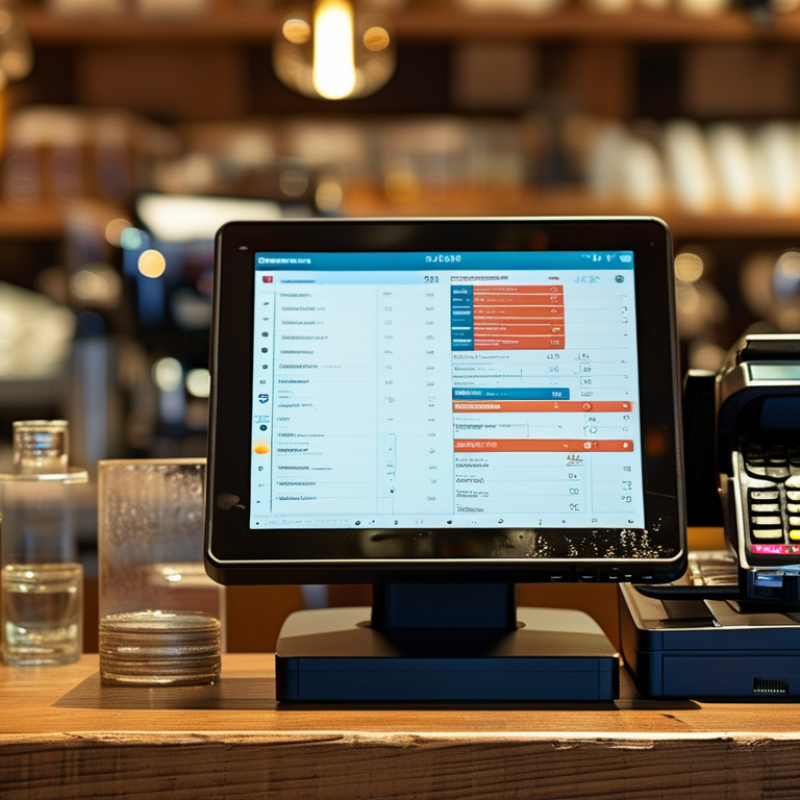
Picking out the best Touch Pos Display in 2026 isn't just about comparing screen sizes or prices. It’s really about what matches your environment. For example, if you're running a busy café, you'll probably want a bright 15-inch screen with quick touch response and a surface that can handle small spills without a fuss. On the other hand, a retail counter might need something with adjustable viewing angles, a sturdy stand, and an easy way for customers to interact. Little details like these matter more than you might think.

Start by considering things like touch accuracy, brightness, viewing comfort, and durability—stuff you'll use every day. Capacitive touchscreens usually feel smooth, but they can respond differently if you're wearing gloves or if your fingers are wet. Make sure to look into the operating system, processor speed, memory, ports, mounting options, and whether it plays nicely with your network. Something that looks super slick in a showroom might feel painfully slow when things get busy during lunchtime. Whenever possible, test the display with real stuff—menus, barcode scanners, receipt printers, payment devices—to see how it all works together.

And don’t forget about longevity and support! Check out the warranty, how easy it is to get replacements, software updates, and find out if the supplier offers installation help or reliable after-sales support. Remember, no one’s perfect—sometimes staff feedback might reveal issues like glare near windows or awkward cable setups that specs don’t mention. The key is balancing performance, comfort, security, and total costs of ownership. Going for the cheapest option might end up costing more if it causes frequent downtime and disrupts sales. So, in 2026, pick the Touch Pos Display that’s right for your workflow—don’t just go for the one with the flashiest features.
How to Choose the Best Touch POS Display in 2026?

What Is a Touch POS Display and Why Does It Matter in 2026?

A Pos Display is a touchscreen interface used by staff, customers, or both during checkout. It shows products, prices, taxes, payment choices, and order status. Unlike a passive monitor, it accepts direct input through taps, swipes, and on-screen buttons. This reduces handoffs between a cashier and a separate payment device. Small details matter.

The 2024 Worldpay Global Payments Report projects digital wallets will reach 30% of global point-of-sale transaction value by 2027. That change makes a clear, responsive display more important in busy stores.

Mordor Intelligence estimates the POS terminal market could grow by roughly 8% annually through 2029. More transactions will pass through connected screens.

Retailers should therefore evaluate brightness, touch accuracy, viewing angles, and system compatibility, not only screen size.

In practical testing, a good display remains readable beside a sunny window. It should also respond when fingers are wet or covered with thin gloves. A 15-inch panel may suit a compact counter, while a larger screen can reduce scrolling in food-service orders.

My own caution: touch is not automatically efficient. Poor calibration creates repeated taps, queues, and visible customer frustration. Security deserves equal attention. PCI Security Standards Council guidance emphasizes protecting payment data through controlled access, secure configurations, and regular maintenance. The best choice balances speed, accessibility, durability, and security rather than chasing impressive specifications.

Which POS Display Size, Resolution, and Touch Technology Fit Your Business?

Choosing a Retail Pos Display starts with the counter, not a specification sheet. A small café often needs a 10–15-inch screen. It preserves workspace and keeps payment actions visible. A supermarket lane may suit a 15–19-inch display. Staff can read modifiers without leaning forward. Self-service stations need more room. A 21–24-inch screen supports larger buttons and clearer instructions. Grand View Research valued the global POS terminals market at approximately 110.21 billion dollars in 2023. That growth shows strong demand, but it does not prove every business needs a larger panel.

Resolution should match viewing distance and content density. At arm’s length, 1080p usually displays prices, menus, and accessibility text clearly. Higher pixel density helps detailed catalogues and product images. It can also create scaling issues and unnecessary costs. Test real screens at 100% scaling. Look closely.

Touch technology changes daily comfort. Projected capacitive touch feels fast and supports multitouch on clean, indoor counters. Resistive touch works better with gloves, pens, or occasional moisture. Infrared touch suits larger displays, although edge calibration needs regular checking. Fortune Business Insights projects the touchscreen market to grow from 84.80 billion dollars in 2024 to 163.74 billion dollars by 2032. The forecast supports investment, not careless buying. I would question any recommendation based only on market growth. A bright display can still fail under ceiling glare, and a beautiful interface can frustrate tired staff.

How to Choose the Best Touch POS Display in 2026?

Which POS display size, resolution, and touch technology fit your business?

10.1-inch compact display

A practical fit for cafés, mobile checkout stations, and counters with limited space. The 1280 × 800 resolution provides 1.02 million pixels.

15.6-inch standard display

A balanced choice for restaurants, retail counters, and general POS workflows. Full HD resolution provides 2.07 million pixels for menus and multi-panel interfaces.

21.5-inch large display

More suitable for high-visibility counters, self-service applications, and interfaces requiring larger buttons or more information at once.

Touch technology: Projected capacitive touch is typically suited to fast finger interaction and supports multi-touch gestures. Infrared touch can be useful when users wear gloves or when a larger touch surface is required. Select the technology according to the environment, cleaning process, glove use, and required durability.

The chart uses representative display sizes and standard resolutions commonly used in POS equipment. Pixel totals are calculated from each listed resolution; actual specifications vary by model.

How to Compare Operating Systems, Software Compatibility, and Connectivity

Choosing the best touch POS display in 2026 requires more than checking screen size or brightness. The operating system should match your staff’s habits, security standards, and existing workflow. A simple interface can reduce training time, but limited customization may frustrate experienced users. Test real tasks, not just menus.

Software compatibility matters every day. Confirm support for payment tools, inventory systems, receipt printers, scanners, and remote management platforms. A Handheld Pos Display should exchange data reliably when employees move between counters and storage areas. Ask whether updates happen automatically or require technical assistance. Small details matter.

Connectivity deserves practical testing. Check Wi-Fi performance near refrigerators, thick walls, and crowded customer areas. Ethernet can provide steadier service at fixed stations, while Bluetooth helps connect mobile accessories. During one store trial, a device worked well in the office but lost connection near the entrance. The checklist missed that area. It was a useful failure. Include offline procedures, cable access, and recovery time in your evaluation. Reliability is not only about speed. It is about what happens after something goes wrong.

How to Evaluate Durability, Ergonomics, and Maintenance Requirements

How to Choose the Best Touch POS Display in 2026?

A durable touch POS display should survive constant tapping, spills, and hurried cleaning. Check its rated operating hours and touch-surface hardness before comparing screen size. For busy counters, sealed edges and an IP54-rated front can reduce damage from dust and splashes. Still, ratings are not everything. Inspect the cable ports, stand joints, and screen bezel. These areas often loosen first.

Ergonomics affects every transaction. The display should tilt smoothly and remain stable when staff press the lower corners. A height-adjustable stand can reduce wrist and neck strain during long shifts. Test the viewing angle under bright counter lighting. Reflections may hide small buttons and cause repeated taps. Leave enough space for a Payment Terminal Display, receipt printer, and customer movement. Crowded hardware slows service.

Maintenance should be simple enough for a busy employee to perform correctly. Look for a smooth glass surface without deep seams, and confirm which cleaning agents are permitted. Harsh chemicals can damage coatings. Keep a short inspection log for loose mounts, dead touch zones, cable wear, and brightness changes. A five-minute weekly check helps. I would not rely on impressive specifications alone. In practical evaluations, small design details often matter more than a higher resolution. We sometimes overlook them. Repair access, replacement availability, and clear service documentation also influence the display’s real working life.

What Security, Privacy, and Payment Features Should You Check?

How to Choose the Best Touch POS Display in 2026?

A touch POS display should protect payments before it improves the checkout experience. Look for PCI PTS-approved hardware, encrypted connections, tokenized payment data, and secure boot. End-to-end encryption also reduces exposure when payment information travels across networks. Verizon’s 2025 Data Breach Investigations Report found vulnerability exploitation increased by 34%. That figure makes delayed security updates difficult to justify. Choose displays with signed firmware, automatic patches, and separate staff permissions. A bright screen is useful, but a locked-down system matters more.

Tips: Ask how long payment data remains stored. Prefer systems that collect only essential customer information. Check privacy controls for receipts, loyalty profiles, cameras, and analytics. IBM’s Cost of a Data Breach Report 2024 placed the global average breach cost at 4.88 million dollars. Strong access logs, multi-factor authentication, and rapid account removal can limit the damage. Test the emergency process, too. Can staff disable a lost terminal within minutes?

Privacy needs practical testing, not only policy documents. Stand beside the display and inspect shoulder-surfing risks, screen timeout settings, and receipt visibility. Confirm that updates cannot be installed through unverified devices. I would not trust vague claims such as “bank-level security.” Request audit evidence, data-retention details, and incident-response contacts. No display is perfectly safe. Even a compliant terminal can fail through weak passwords, careless configuration, or rushed training.

How to Compare Total Cost, Support, and Long-Term Business Value

How to Choose the Best Touch POS Display in 2026?

Price is only the opening number. Compare the full three-year cost, including mounts, cables, software compatibility, repairs, training, and replacement units. A bright display may reduce cashier errors near a sunlit window. However, excessive brightness can increase energy use and eye fatigue. Measure the counter before ordering. A few centimeters can affect queue flow.

Payment flexibility matters. The 2024 Worldpay Global Payments Report estimated that digital wallets represented 30% of global point-of-sale transaction value in 2023. Choose a display that supports your payment hardware, receipt workflow, and future interface updates.

Security also deserves a budget line. IBM’s Cost of a Data Breach Report 2024 placed the global average breach cost at $4.88 million. A secure operating system, controlled updates, and rapid patch support are not optional extras.

Support separates a useful display from an expensive obstacle. Ask about response times, spare-part availability, warranty limits, and remote diagnostics.

Test the support process before purchase. Send a difficult question. Count the hours until a clear answer arrives. Gartner’s 2024 research on customer service emphasizes the growing role of digital self-service, but self-service cannot replace accountable human support during a checkout outage.

I would still request a loaner-device policy. Reports provide useful benchmarks, yet they cannot predict your store’s dust, glare, staff turnover, or peak-season pressure. Budget honestly for those imperfections.

FAQS

: What makes a touch POS display durable?

: Look for long operating-hour ratings, a hard touch surface, sealed edges, and splash-resistant protection. Small parts fail first. Inspect cable ports, stand joints, and the screen bezel for looseness.

How can I test display ergonomics?

Tilt the display smoothly and press the lower corners to check stability. An adjustable stand can reduce wrist and neck strain during long shifts. Check viewing angles under bright counter lighting.

Why does screen placement matter at checkout?

Leave room for payment equipment, receipt printing, and customer movement. Crowded counters can slow transactions and create accidental contact. Reflections may hide small buttons.

What maintenance features should I prioritize?

Choose a smooth glass surface with shallow seams and clearly approved cleaning agents. Harsh chemicals may damage screen coatings. Keep a weekly inspection log.

What should a weekly inspection include?

Check loose mounts, dead touch zones, cable wear, brightness changes, and damaged edges. Five minutes is often enough. Small checks can prevent larger service problems.

Which security features should a payment display support?

Seek secure boot, encrypted connections, tokenized payment data, signed firmware, and timely security updates. Separate staff permissions also reduce unnecessary access. Specifications alone are not enough.

How can a business protect customer privacy?

Test screen timeout settings, receipt visibility, and shoulder-surfing risks beside the display. Collect only essential customer information. Review access logs and remove inactive accounts quickly.

What payment data questions should I ask suppliers?

Ask how long payment data remains stored and where it travels. Request evidence of security testing, update procedures, retention rules, and incident contacts. Avoid vague promises.

How should I evaluate serviceability?

Confirm repair access, replacement availability, cable durability, and clear service documentation. A higher-resolution screen may matter less than easy repairs. I sometimes overlook that detail.

Conclusion

Choosing the right Touch Pos Display in 2026 requires more than comparing screen prices. Businesses should first consider display size, resolution, viewing angle, brightness, and touch technology based on their environment and workflow. A compact screen may suit limited counters, while larger, high-resolution displays can improve order accuracy and staff efficiency. It is also important to review the operating system, software compatibility, connectivity options, and integration with payment, inventory, and management tools.

Long-term performance depends on durable materials, easy cleaning, ergonomic adjustment, and simple maintenance. Buyers should also evaluate user access controls, data protection, secure payment support, and privacy features. Finally, compare the total cost of ownership, including installation, accessories, software, technical support, repairs, and future upgrades. The best Touch Pos Display is not necessarily the least expensive option, but the one that delivers reliable performance, secure operation, flexible compatibility, and measurable value as the business grows.

Charlotte

Charlotte

Charlotte is a dedicated marketing professional with a deep understanding of the technology sector, particularly in the design and R&D of a diverse array of high-quality battery products. With expertise in POS batteries, PDA batteries, laptop batteries, vacuum cleaner batteries, drone batteries, as......
Previous Top 10 Lithium Cobalt Battery Suppliers in China ?