Picking out a Symbol Battery isn’t just about finding a pack that has the right shape. It’s more like a careful compatibility decision—stuff like voltage, capacity, chemistry, connector design, and how it handles charging. Even if a battery fits neatly into your scanner, it doesn’t mean it’ll perform well during long shifts in the warehouse.
Dr. M. Stanley Whittingham, a renowned lithium-battery researcher, once said, “You have to match the battery to the application.” That advice still holds true for Symbol devices. For example, a retail worker needs consistent performance across lots of scans, while someone working in a warehouse might need a battery with higher capacity for those long days. So, the right Symbol Battery really depends on your device model, daily workload, charging setup, and operating conditions.
Make sure to double-check the model number! Even if two scanners or mobile computers look alike, their batteries can be totally different. Compare the rated voltage and capacity with the original battery, and don’t forget about the connector, locking tabs, battery contacts, and charging instructions—tiny differences can make a big difference.
And don’t just go for the biggest capacity; there's more to consider.
A trustworthy supplier will provide clear specs you can trace, straightforward warranty terms, and documented safety tests. Genuine or well-made replacement batteries tend to be safer and more reliable—they help prevent overheating, overcharging, and early wear. But keep in mind, “higher capacity” doesn’t automatically mean better performance. It can add extra weight, slow down charging, or even lead to more heat.
Personally, I always say: don’t just rely on product listings. Take a couple of extra minutes to check the device manual and the battery label before placing an order. It might seem like a small thing, but a bit of care upfront can save you from scanning hiccups, damage to your equipment, or costly replacements down the line.
Understand the Device’s Power Requirements
How to Choose a Symbol Battery for Your Device?
Understand the Device’s Power Requirements
Choosing a Symbol Replacement Battery starts with the device’s actual power requirements, not its physical size. Check the original battery label, service documentation, and the device’s input rating. Voltage must match precisely. A small difference can cause unstable operation or permanent damage.
Capacity matters too. Milliamp-hours show how long the battery may operate under suitable conditions. However, real performance depends on screen brightness, wireless communication, scanning frequency, and processor activity. A handheld scanner used continuously needs more energy than one checked occasionally. Peak current is also important. Some devices draw extra power when starting, transmitting data, or activating an attached light.
In practical testing, monitor the device during its busiest task. A multimeter can reveal unexpected voltage drops, while a controlled runtime test shows whether the capacity is realistic. Temperature deserves attention. Batteries used in cold storage rooms may deliver less usable energy than laboratory figures suggest. I once judged a replacement only by its capacity rating, and the device still shut down during heavy scanning. That mistake changed my inspection process. Now I compare voltage, connector design, protection features, charging limits, and operating temperature before approval. Specifications can be incomplete. Independent verification is safer.
Identify the Correct Symbol Battery Type
How to Choose a Symbol Battery for Your Device?
Identify the correct symbol battery type before checking price or capacity. Read the code printed on the old cell and inside the device. Under IEC 60086-1, “CR2032” means a lithium manganese-dioxide coin cell. “LR6” identifies an alkaline AA battery, while “HR6” indicates a rechargeable nickel-metal hydride cell. The letters matter. So does the number.
Check three details: chemistry, size, and voltage. A matching shape is not enough. A CR2032 and a rechargeable LIR2032 may look similar, but their voltage and charging requirements differ.
Never install a rechargeable cell unless the device supports charging. Confirm the positive and negative symbols. Inspect the battery compartment for a voltage label, such as 1.5 V or 3 V. A loose fit can interrupt power or create heat.
Use the device manual when markings conflict. The International Energy Agency reported that global battery demand in the energy sector reached about 750 GWh in 2023, showing how quickly battery technologies are expanding. That growth also creates confusion.
Some online listings use incomplete symbols. I have seen size codes copied incorrectly. Recheck the datasheet, dimensions, and operating temperature. IEC 60086-1 helps standardize primary battery designations, but it does not replace the device manufacturer’s requirements. Small details decide compatibility.
Evaluate Operating Conditions and Safety Features
How to Choose a Symbol Battery for Your Device?
Evaluate the device’s operating conditions before comparing battery capacity. Check the required voltage, current, dimensions, and connector position. A battery that fits physically may still perform poorly under load. Measure peak current, not only the device’s average consumption. This matters for cameras, sensors, medical monitors, and compact control equipment. Small details matter. Record the highest and lowest expected temperatures. Cold conditions can reduce available capacity and increase internal resistance. Heat can accelerate aging, swelling, and leakage.
Safety features deserve equal attention. Look for protection against overcharge, over-discharge, short circuits, and excessive current. A temperature sensor can disconnect the battery when conditions become unsafe. Choose cells with documented test results and traceable production information. Review the relevant safety standard for your region and application. Do not rely on capacity claims alone. An independent test report is more useful than a dramatic specification sheet.
Installation also affects reliability. Secure the battery against vibration, sharp edges, and crushing forces. Keep it away from heaters and unprotected metal contacts. I once focused too heavily on runtime and overlooked the enclosure temperature. That mistake changed my selection process. However, field conditions are not always predictable. Leave a reasonable safety margin, and inspect the battery during prototype testing. If the device operates unattended, use monitoring and controlled charging equipment. A slightly larger battery may be safer than the smallest available option.
How to Choose a Battery for Your Device: Operating Temperature Evaluation
Representative continuous operating-temperature ranges for common battery chemistries. Always verify the final cell datasheet and protection requirements.
Selection guidance: Choose a chemistry whose temperature range covers the device environment with an adequate safety margin.
Rechargeable lithium-based batteries generally require protection against overcharge, over-discharge, excessive current, short circuits, and overheating.
For high-temperature or high-current applications, confirm that the cell, protection circuit, enclosure, and charging system are all rated for the intended conditions.
Confirm Quality, Shelf Life, and Replacement Options
When choosing a Symbol Battery, confirm performance before comparing prices. Check the exact voltage, chemistry, dimensions, connector, and discharge rating. A quality cell should have clear lot coding, sealed packaging, and test documentation. IEC 60086 standards evaluate primary batteries for discharge performance, leakage, and storage behavior. These checks matter when a scanner runs through a full warehouse shift.
Shelf life deserves close attention. Many lithium coin cells advertise storage lives of up to ten years, but heat shortens that period. The U.S. Department of Energy notes that battery aging accelerates at elevated temperatures. Store replacements in a cool, dry cabinet, not beside charging equipment. I once trusted a “new” battery with faded packaging. It failed within days. That mistake was avoidable.
Replacement planning is practical engineering. Confirm whether the Pos Battery uses a removable pack or a sealed assembly. Compare the original capacity, terminal layout, protection circuit, and charging requirements. Keep two verified spares for critical devices. The International Energy Agency reported that battery demand for the energy sector reached 750 GWh in 2023, showing how quickly battery supply chains are expanding. More choices do not always mean better compatibility. Ask for cycle-life data, warranty terms, and safe disposal guidance. Some specifications remain unclear. That deserves a second check.
How to Choose a Symbol Battery for Your Device? - Confirm Quality, Shelf Life, and Replacement Options
| Battery Type |
Chemistry |
Nominal Voltage |
Standard Size
(Diameter × Height) |
Typical Capacity* |
Typical Unopened Shelf Life |
Quality and Application Notes |
Replacement Options |
| CR2016 |
Lithium manganese dioxide |
3.0 V |
20.0 × 1.6 mm |
About 90 mAh |
Approximately 8–10 years |
Good energy density and low self-discharge; commonly used in compact sensors, calculators, and small electronic devices. |
Use another CR2016 with the same voltage and dimensions. Do not stack cells unless the device specifically supports it. |
| CR2025 |
Lithium manganese dioxide |
3.0 V |
20.0 × 2.5 mm |
About 160–170 mAh |
Approximately 8–10 years |
A balanced choice for low-drain devices where the holder has limited vertical space. |
CR2025 is the direct replacement. CR2016 may have lower capacity, while CR2032 may be too thick for the holder. |
| CR2032 |
Lithium manganese dioxide |
3.0 V |
20.0 × 3.2 mm |
About 210–240 mAh |
Approximately 8–10 years |
Widely used for memory backup, remote controls, meters, medical accessories, and wireless sensors; offers low leakage and stable voltage. |
Use another CR2032 whenever possible. A CR2025 may fit some holders but can cause loose contact or reduced runtime. |
| CR2450 |
Lithium manganese dioxide |
3.0 V |
24.5 × 5.0 mm |
About 500–620 mAh |
Approximately 8–10 years |
Higher capacity than smaller coin cells; suitable for devices requiring longer service intervals and low-to-moderate current. |
Replace only with a CR2450 of the same physical size and voltage; smaller cells are not equivalent substitutes. |
| LR44 / AG13 |
Alkaline manganese dioxide |
1.5 V |
11.6 × 5.4 mm |
About 100–120 mAh |
Approximately 2–3 years |
Lower cost, but voltage declines more quickly than silver-oxide cells; best for low-cost, low-drain devices. |
LR44 or AG13 can be direct designations for alkaline cells. Confirm voltage and dimensions before using alternatives. |
| SR44 / 357 |
Silver oxide |
1.55 V |
11.6 × 5.4 mm |
About 150–180 mAh |
Approximately 3–5 years |
Provides a more stable voltage and generally higher usable capacity than alkaline cells of the same size. |
SR44 or 357 may be suitable replacements where the device specifies a 1.55 V silver-oxide cell. Check the user manual first. |
| A27 / 27A |
Alkaline manganese dioxide |
12 V |
Approx. 8.0 × 28.2 mm |
About 18–22 mAh |
Approximately 3–5 years |
A small cylindrical battery commonly used in compact transmitters and signaling devices; not interchangeable with coin cells. |
Use an A27 or 27A only when the device specifies the same 12 V format and dimensions. |
Selection Checklist:
Confirm the exact battery code, voltage, dimensions, polarity, terminal style, and required capacity. Check the expiration date, packaging condition, leakage protection, safety markings, and test records before purchase. Capacity values are typical ranges and vary with discharge current, operating temperature, storage conditions, and manufacturer specifications.
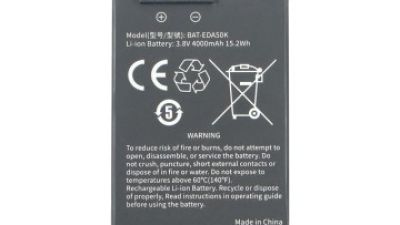
Honeywell BAT-EDA50K Replacement Battery: 3.8V 4000mAh Insights from MarketsandMarkets and Grand View Research
Market research insights from MarketsandMarkets and Grand View Research indicate continued demand for dependable replacement batteries in warehouse automation, mobile data collection, and industrial scanning. The 3.8V 4000mAh replacement battery is designed to support BAT-EDA50K data-collection terminals, delivering a rated energy capacity of 15.20Wh for stable performance during extended work shifts and intensive scanning tasks.
Its reinforced casing improves resistance to everyday drops and handling impacts, while the integrated smart protection circuit helps prevent overcharging, short circuits, and excessive discharge. Manufactured to match the original device specifications, the battery can be installed without modification and is suitable for demanding warehouse and logistics environments where consistent power is essential.
The battery is certified to CE, RoHS, and UN38.3 requirements, supporting safer handling, transportation, and operation. A 12- to 15-month warranty provides additional purchasing assurance for distributors, system integrators, and industrial users. Supplied by an experienced China-based factory, it is produced with a focus on reliable quality, compatibility, and practical performance for daily scanning and data-collection operations.
Conclusion
Choosing the right Symbol Battery begins with understanding your device’s power requirements, including its voltage, current demand, operating time, and energy consumption. Next, identify the correct battery type and compare important factors such as capacity, chemistry, and expected performance. A battery with higher capacity may provide longer operation, but it must still match the device’s electrical specifications and charging or replacement requirements.
Physical compatibility is equally important. Check the battery’s dimensions, polarity, connector style, and installation method before purchasing. You should also consider the environment in which the device will operate, including temperature, humidity, vibration, and safety needs. Finally, evaluate product quality, shelf life, storage conditions, and the availability of suitable replacement options. By reviewing these details carefully, you can select a Symbol Battery that delivers dependable performance, fits properly, supports safe operation, and offers practical long-term value for your device.