Picking the right [Laptop Battery](https://www.hicellux.com/ce-certification-high-quality-laptop-battery-factory-suppliers) isn’t just about keeping things running—it really impacts how your device performs and how long it lasts. A solid, reliable battery can make all the difference, especially when you're tackling something important. Sadly, a lot of folks skip over this part or just grab any generic battery without thinking about compatibility or quality. It’s tempting to try different brands, but trust me, that can sometimes lead to more headaches than it’s worth. Some cheaper batteries might not give enough power, or they might crap out faster than you’d hope. That's why sticking to genuine parts from trusted brands like Dell or HP usually pays off in the long run. With so many options out there, it’s super helpful to understand exactly what your laptop needs—doing a little digging into specs can save you a lot of trouble down the line. And honestly, a low-quality battery can leave you stranded at the worst moment, which nobody wants. So, taking a bit of time to make an informed choice can really help you avoid common pitfalls when it’s time to replace your battery.
Understanding Laptop Battery Types and Their Specifications
When selecting a laptop battery, it's crucial to understand the different types available. Lithium-ion and lithium polymer are the most common types. Lithium-ion batteries are widely used due to their high energy density and longevity. However, they can overheat if not managed properly. Lithium polymer batteries, on the other hand, are lighter and can be molded into different shapes, but they may have a shorter lifespan. Understanding these differences is key.
Specifications should also be a focus. Battery capacity is measured in watt-hours (Wh) or milliamp-hours (mAh). Higher numbers indicate longer usage times. However, a battery's efficiency can vary based on the laptop's performance needs. Therefore, a high-capacity battery doesn't always mean better performance. It's essential to consider how you use your laptop daily.
Compatibility is another area that requires careful attention. Not all batteries fit all laptop models. This can lead to issues when replacements are needed. If you're unsure, consulting the laptop's documentation or a professional can help. Investing in the right battery ensures reliability, enhancing your overall experience.
Battery Life Comparison of Laptop Battery Types
Evaluating Battery Compatibility with Your Laptop Model
When choosing a laptop battery, compatibility is key. Each laptop model requires specific battery characteristics. It’s crucial to check the specifications like voltage and capacity. A mismatch can affect performance or even damage your device. According to industry reports, around 30% of battery issues arise from incompatibility. This highlights the need for thorough evaluation before making a purchase.
Look for reliable sources when checking compatibility. Many online databases offer cross-referencing tools. These tools help you find batteries that match your laptop model. Ensure you are searching for a “Laptop Ki Battery” that adheres to your device’s requirements. Reading user reviews can also provide insights into real-world experiences.
Always confirm the battery's supplier reputation. Off-brand batteries may seem tempting due to lower prices, but they often lack safety certifications. Reports indicate that such batteries can fail quickly or even pose safety risks. Taking the time to evaluate your options thoroughly can save you from future headaches.
Assessing Battery Capacity and Longevity for Your Needs
When evaluating laptop batteries, it’s crucial to consider capacity and longevity. An Old Laptop Battery can severely impact device performance. Battery capacity refers to how much energy a battery can store. It’s usually measured in milliamp hours (mAh). A higher capacity often means longer use between charges.
Longevity is about how long a battery can last overall. Over time, lithium-ion batteries lose capacity. An old laptop battery might show signs of wear, such as rapid drainage or swelling. Regularly checking battery health can save you frustration later. Consider replacing an old battery if it cannot hold a charge.
Selecting the right battery involves more than just specifications. Personal usage patterns matter too. For example, users who travel need longer-lasting batteries. Always read user reviews for real-world insights. Balancing capacity, longevity, and personal needs ensures you choose the right battery for optimal laptop performance.
Analyzing Brand Reputation and Customer Reviews for Batteries
When choosing a laptop battery, analyzing brand reputation is essential. Look for manufacturers with a proven track record. Longevity and customer satisfaction are key indicators. Brands with years of experience often provide reliable products. Check online forums and tech websites for insights.
Customer reviews can reveal a lot about battery performance. Real users often share honest feedback. Look for common themes in the reviews. Are people pleased with battery life? Do they mention issues like overheating? Pay attention to the number of reviews, too. A product with many reviews is often more reliable.
Don't ignore the negatives. Some users might highlight weaknesses you hadn't considered. Short battery life can affect your workday significantly. If multiple reviews mention the same problem, it’s worth reconsidering your choice. Transparency in reviews helps build trust. Always seek out both positive and negative feedback for an informed decision.
Considering Warranty and Return Policies for Battery Purchases
When selecting a laptop battery, warranty and return policies play a crucial role. A strong warranty offers peace of mind. Most brands provide a standard one-year warranty. However, some may extend it up to three years. This can be beneficial if the battery fails prematurely.
Pay attention to the return policy as well. Some retailers allow returns within 30 days while others may allow only 14 days. A flexible return policy enables you to test the battery and ensure it meets your needs. If it doesn’t, you can return it hassle-free.
Reading user reviews can reveal insights about battery longevity and performance. Look for feedback on real-life usage. Some batteries may perform well initially but degrade too quickly. Choose wisely to find a Top Battery Laptop option. Researching these aspects can prevent future disappointment. The ideal choice balances quality, warranty, and return conditions.
Identifying Features of High-Quality Laptop Batteries
When selecting a high-quality laptop battery, several key features should be closely examined. First, pay attention to the battery's capacity. Look for mAh (milliamp hours) ratings that indicate how long the battery can last. A higher rating generally suggests better performance. It's essential to understand that often, older laptops may not be compatible with newer, more powerful batteries.
Next, check the battery type. Lithium-ion batteries are common and typically provide better lifespan and performance than older technologies. Ensure the battery comes with safeguards against overheating and short-circuiting. These features enhance not only the battery's longevity but also the safety of your device. Compatibility is crucial, especially for replacing a Laptop Old Battery. An incorrect battery can lead to poor performance or even damage the laptop.
Lastly, consider manufacturer reputation. Trustworthy manufacturers often provide better warranties and customer support. Reading user reviews can reveal hidden issues, which can be invaluable in your decision-making process. A reliable battery should not only fit seamlessly but also work efficiently under various conditions. Always reflect on how vital it is to choose a quality battery for both performance and safety.
Top 10 Tips for Choosing the Best Laptop Battery
| Feature |
Description |
Importance |
| Capacity (mAh) |
The energy storage size of the battery. |
Higher capacity means longer usage time. |
| Voltage (V) |
The electric potential of the battery. |
Must match the laptop's requirements for optimal function. |
| Cell Type |
Indicates the technology used (Li-ion, Li-polymer). |
Different types have varying lifespans and performance. |
| Warranty Period |
Length of the manufacturer's coverage for the battery. |
Longer warranties often indicate higher quality. |
| Charging Time |
Time taken to fully charge the battery. |
Faster charging is more convenient for users. |
| Cycle Life |
The number of charge/discharge cycles the battery can undergo. |
Higher cycle life indicates longer battery longevity. |
| Safety Features |
Includes protections against overheating and short-circuits. |
Essential for preventing battery-related hazards. |
| Compatibility |
The battery must fit and work with specific laptop models. |
Ensures functionality without issues. |
| Brand Reputation |
The manufacturer's standing in the industry. |
Reputable brands often provide reliable products. |
| Cost |
Price of the battery relative to its features. |
Must balance among quality and budget. |
Exploring Tips for Maintaining and Extending Laptop Battery Life
Maintaining and extending your laptop battery life is crucial for productivity. Start by adjusting your display brightness. A lower brightness consumes less power. Reducing screen time while on battery can significantly boost longevity. Also, avoid keeping your laptop plugged in all the time. Constant charging may wear down the battery faster over time.
Another aspect worth considering is managing background applications. Close unnecessary programs that drain power. Check your task manager regularly. Finally, temperature plays a vital role in battery health. Avoid exposing your laptop to extreme heat or cold. This can shorten battery lifespan. Taking these actions might seem small but can lead to improved battery performance. Reflect on your habits. Are you charging correctly? Managing battery life requires consistent effort and awareness of usage patterns.
Maximize Your HP Notebook's Performance with the 11.4V 3600mAh HT03XL Replacement Battery
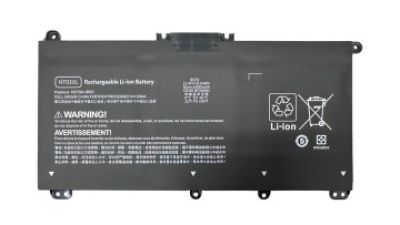
In today's fast-paced digital landscape, ensuring peak performance from your HP Notebook is essential for both productivity and entertainment. The 11.4V 3600mAh HT03XL replacement battery offers a real capacity of 41.04Wh, delivering stable and reliable power essential for daily tasks. This high-capacity battery is designed to meet the demands of various applications, including office work and business computing, making it an ideal choice for professionals who rely on their devices.
Equipped with a smart IC chip, this battery provides robust overcharge protection, safeguarding your device from potential damage. The built-in protection circuit addresses overcharging, short circuits, and over-discharge scenarios, maintaining the integrity of your notebook's performance. Furthermore, it boasts 100% compatibility with HP device specifications, ensuring that no modifications are required during installation. With CE, RoHS, and UN38.3 certifications, users can trust the safety and efficiency of this battery, supported by a generous 12-15 month warranty.
Industry research indicates that power efficiency is a critical factor influencing laptop performance, with a direct correlation between battery reliability and user satisfaction. By choosing a reliable replacement battery like the HT03XL, users can enhance their notebooks' performance, staying productive whether in an office setup or during multimedia consumption. The importance of dependable power sources cannot be overstated, as they significantly impact the overall user experience in various computing environments.
FAQS
: Compatibility is crucial. Each laptop needs specific battery features. A mismatch can harm performance or damage the device.
Use online databases with cross-referencing tools. These help you find batteries suited to your laptop model.
Confirm the supplier's reputation. Off-brand batteries may lack safety certifications and can fail or pose risks.
Lower your display brightness. Reducing screen time on battery can significantly improve longevity.
No, constant charging can wear down the battery over time. Avoid keeping it plugged in all the time.
Unnecessary programs drain power. Close them regularly to conserve battery on your laptop.
Extreme heat or cold can shorten battery lifespan. Protect your laptop from such conditions.
User reviews provide insights into real-world experiences. They can help you make informed purchase decisions.
Consider if you are charging correctly. Consistent effort is needed for effective battery management.
Yes, better maintenance can lead to improved performance and longer battery life. It requires awareness and effort.
Conclusion
When selecting a laptop battery, it's essential to understand the different types and specifications available. Start by ensuring compatibility with your specific laptop model, as this will directly influence performance. Assessing battery capacity is crucial; higher capacity often translates to longer usage times, which should align with your personal or professional needs. Additionally, research brand reputation and customer reviews to gauge reliability and quality.
Moreover, consider the warranty and return policies offered when purchasing a laptop battery, as these can provide peace of mind. Features like built-in safety mechanisms and sturdy construction are indicators of a high-quality battery. Lastly, maintaining and extending the life of your laptop battery involves practices such as optimal charging habits and regular maintenance checks. Following these guidelines can help you make an informed decision and enjoy a longer-lasting laptop battery.